Phone Number Location Tracker
- 4.0
- Rating
- 5.00M
- Installs
- Free
- Price

 Analysis by App-foxy
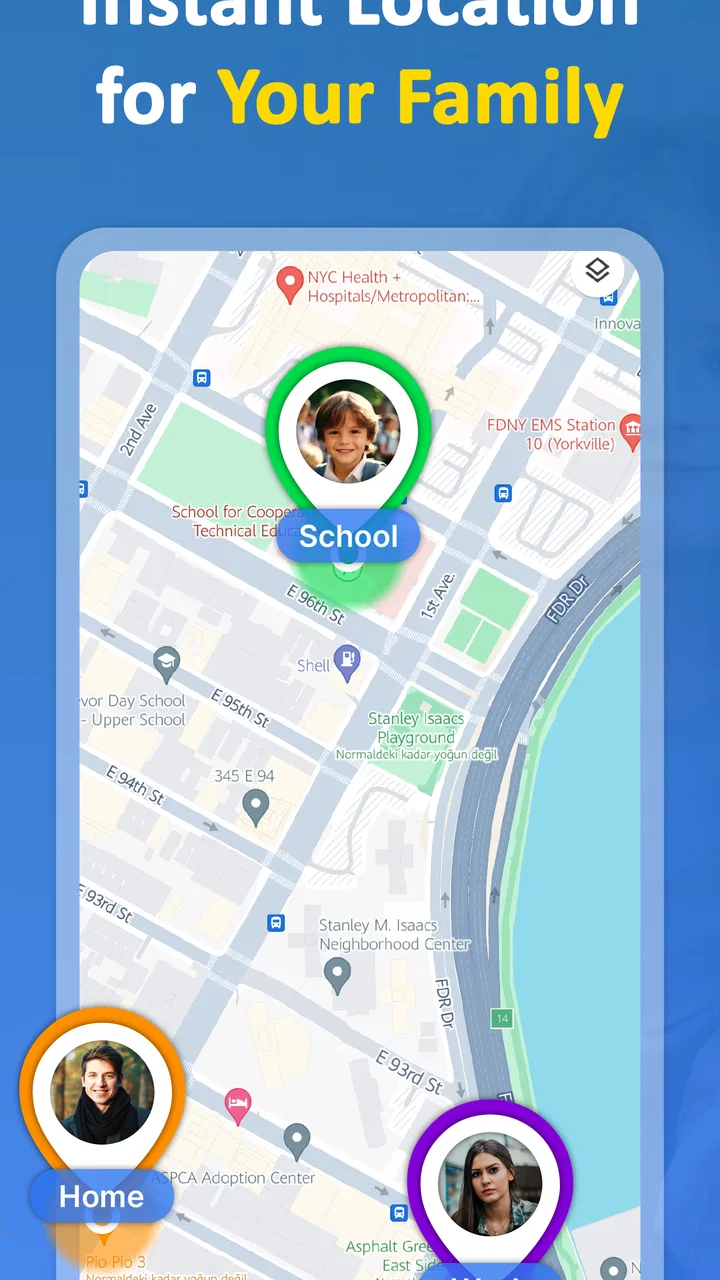
Keeping track of family members is one of those tasks that sounds simple until everyone is moving in different directions. A child is walking home, a partner is travelling across town, or an older relative has not answered a message yet. Phone Number Location Tracker, developed by Midgard Production, is built for that kind of family-focused situation. I found its appeal easy to understand: it puts location tracking at the centre instead of treating it as a minor extra inside a broader social or messaging app.
This is a free parenting app for Android and iOS, rated for Everyone, with optional in-app purchases ranging from $4.99 to $22.99 per item. Its store summary presents it as a real-time location tool for family security, and that description gives the right starting point, although the practical experience depends heavily on the people being tracked, their phones, and the quality of their network connection.
After spending time considering how it fits into ordinary family routines, I see it as most useful when everyone agrees on its purpose beforehand. It is not a magic solution for finding any phone from a number alone, and it should not replace a call, a text, or emergency services. Used openly and sensibly, though, it can reduce the number of “Where are you?” messages that interrupt a busy day.
You May Also Like

 Blood Strike: 2.5 Anniversary
Blood Strike’s Loadouts Turn Every Drop Into a Tactical Gamble
A close look at Blood Strike’s custom loadouts: how fast access to signature weapons reshapes its battle royale rhythm, rewards preparation, and narrows the gap between fights.

 Pandora - Music & Podcasts
Pandora’s Music Is Easy to Start, but Harder to Recover
Pandora’s strength is its low-effort path from a seed to a station. Its weak spot is how much confidence it asks you to place in connection, setup, and quiet recovery.

 8 Ball Pool
 Is Built on Rivalries, Rematches, and Routine
A close look at the rivalries, rematches, shared routines, and unanswered safety questions that turn a quick pool match into a persistent mobile community.

 Samsung Music
’s Quiet Strength Is Playing What You Already Own
Its reach comes less from spectacle than from dependable access to a personal library. That simplicity is both the app’s strongest retention engine and its ceiling.

 AccuWeather: Weather Radar
AccuWeather Review: A Quick, Clear Forecast for Everyday Decisions
For everyday plans, the best forecast is the one you can understand quickly. AccuWeather makes rain timing, radar, and local conditions easy to act on, with a few trade-offs.

 Hill Climb Racing
Why Hill Climb Racing Still Turns Crashes Into One More Run
A tiny car, a bumpy hill and one more upgrade: Hill Climb Racing keeps resurfacing because its simple chaos makes every near-miss feel personal.
More From Our News Desk
View All News


How Phone Number Location Tracker fits into family life
I find this app makes the most sense when a family agrees on a specific reason to share locations, rather than treating visibility as an everyday obligation. A practical starting point is to choose a journey or pickup routine, decide who needs to check in, and keep a call or message as the fallback. That shared plan shapes how I would move from setup to a useful check.
A location tool rather than another chat app
The central idea is straightforward: use location information to help family members stay aware of one another. That makes the app different from a standard messaging service, where location sharing may be buried inside a conversation, or from a general parental-control suite that combines screen limits, web filtering, and activity reports. Here, the location question is the main reason to open the app.
I think that focus is valuable for households that do not want a large collection of parenting tools. If your immediate need is knowing whether a family member has reached a destination or is still moving through a journey, a dedicated tracker can feel less cluttered than a full family-management platform. The trade-off is that you should not expect the wider communication and supervision features found in those larger alternatives.
The app has attracted more than a million installs and holds a 4.3 average from around 192 thousand ratings. Those figures suggest that the basic idea resonates with a substantial audience, but popularity should not be confused with suitability for every household. Location apps work best when the family understands what is being shared, why it is being shared, and when it is reasonable to pause or stop sharing.
The first setup conversation matters more than the installation
My strongest practical advice is to discuss consent before anyone starts using the tracker. Parents may understandably want reassurance about a child’s journey, while teenagers or adults may worry that continuous visibility feels intrusive. A calm agreement about when tracking is useful usually produces a better experience than presenting it as a hidden monitoring tool.
A useful arrangement might be to use it during school travel, an evening commute, a long trip, or a visit to an unfamiliar place. That gives the location information a clear purpose. It also helps prevent the common mistake of treating a map as proof that everything is fine. A phone can be left behind, have an outdated position, lose network access, or show a location that needs context.
For younger children, the adult responsible for the device should also explain what the app does in language the child understands. For older family members, the same principle applies in reverse: the person being located should know who can see the information and when. This is not just a privacy preference; it affects whether the tracker becomes a trusted safety habit or a source of arguments.
Where it is genuinely useful
I would recommend considering it for families with changing schedules, especially when several people travel independently. A parent waiting for a child after an activity can check whether the journey appears to be progressing before sending another message. A couple can use it while one person is driving through an unfamiliar area. Relatives coordinating a meeting can reduce vague arrival estimates by checking the current location instead of repeatedly asking for updates.
One realistic example is a weekday afternoon when a child leaves school, takes public transport, and then walks the final part of the trip. A parent working from home may not want to call during every stage. A location tracker can provide a quick indication that the journey is underway, while a message can still handle the important details, such as a cancelled bus or a change of plan. In that situation, the app supports communication rather than replacing it.
It is also useful during travel when family members are spread across a large place. If one person is visiting a shopping area and another is trying to meet them, a map-based view can be more practical than describing nearby shops or street corners. The benefit is greatest when everyone has agreed to keep the app available and their phones connected.
When a conventional alternative may be better
If your family only needs occasional check-ins, ordinary messaging may be simpler. A quick “I arrived” text uses less attention and gives the recipient useful context. For a single journey, temporary location sharing through a familiar communication app may also be more appropriate than maintaining a permanent tracking routine.
Families seeking detailed screen-time controls, browsing supervision, content filtering, or school-focused device management should look at a dedicated parental-control service instead. Phone Number Location Tracker is not the right choice merely because it sits in the parenting category. Its appeal is narrower and more focused: location awareness for family security.
I would also avoid relying on it as the only safeguard for a person who may be in immediate danger. A tracker cannot interpret silence, confirm someone’s physical condition, or guarantee that a displayed position is current. In an emergency, direct contact and local emergency services remain more important than waiting for a map to update.
Why connectivity shapes the experience
The phrase “real-time” sounds reassuring, but real-time location is always a connected experience. The phone being located needs a working connection to send current information, and the person checking the map needs connectivity to receive it. If either side is travelling through poor coverage, using a congested network, or dealing with a device that cannot communicate properly, the result may be delayed or incomplete.
This is the first important trade-off: the app can reduce uncertainty when the network is behaving normally, but it cannot remove the uncertainty created by a disconnected phone. I would treat a displayed position as a recent signal, not as a guarantee that the person is still standing in that exact place.
This matters particularly in underground stations, rural roads, large buildings, crowded events, and cross-border travel. A family member may appear stationary because the phone has not sent a fresh update, not because the person has stopped moving. If you understand that distinction, the app becomes more useful and less alarming.
Using it during busy mobile routines
The app makes the most sense in situations where checking a phone is quick and occasional. A parent can glance at the location information before deciding whether to call. A traveller can use it to coordinate a meeting without writing a long description of their route. A family member waiting at home can avoid unnecessary worry when a journey is taking longer than expected but still appears to be progressing.
At the same time, constant checking can become its own problem. A map encourages people to refresh repeatedly, especially when someone is late. I found it more sensible to agree on meaningful checkpoints: departure, arrival, a long unexpected delay, or a change of route. That approach keeps the tracker from turning every normal pause into a reason for concern.
Battery life is another everyday consideration for any location-based mobile tool. Even without making assumptions about the app’s specific power behaviour, a phone used heavily for navigation, calls, video, or streaming may not remain available throughout a long day. Before a child or traveller leaves, I would check that the device is charged and that the person knows how to contact the family if the battery becomes low.
A practical workflow for a family trip
For a day out, I would set expectations before leaving rather than trying to solve everything after a problem appears. Agree on who will share their location, who needs to check it, and what should happen if the position stops updating. Keep a second communication method available, and make sure each person knows the meeting plan in plain language.
During the trip, use the tracker for broad awareness rather than minute-by-minute supervision. If the location seems delayed, send a message or call before assuming the person is lost. When the journey is complete, stop treating the map as necessary. This simple habit limits unnecessary exposure and makes the app feel like a safety aid instead of a permanent observer.
A less obvious benefit of this workflow is that it reveals where family plans are unclear. If everyone keeps asking which entrance, station, or pickup point to use, the problem may be coordination rather than location. The app can help people meet, but it cannot compensate for an ambiguous plan.
What happens when location information fails
The most important limitation is the possibility of stale information. A location tracker is only as dependable as the chain connecting the phone, its positioning system, the network, and the app. A delay can come from coverage, device settings, battery limitations, or a person simply not carrying the phone. I would never interpret an unchanged position by itself as evidence that something is wrong.
When the display looks outdated, the best recovery process is simple. First, try a normal message or call. Next, consider the person’s expected route and last known plan. If the situation is genuinely urgent, escalate through the appropriate local help rather than repeatedly refreshing the app. This sequence prevents a technical delay from creating either false reassurance or unnecessary panic.
Families should also practise this recovery process before they need it. A short conversation about what “no update” means, who should call whom, and when to seek outside help can be more valuable than learning every screen in the app. The tracker is a supporting tool; the family plan is what gives the information meaning.
Privacy and data-conscious habits
Location is sensitive information, even inside a family. I recommend keeping the sharing circle as small as the household genuinely needs and avoiding casual sharing with people who do not have a clear reason to see it. Do not assume that convenience justifies permanent visibility for every person and every situation.
It is also worth reviewing the arrangement when circumstances change. A child may become more independent, a relative may stop travelling alone, or a temporary trip may end. Turning a location routine into an automatic lifelong habit is easy; deciding when it is no longer necessary requires deliberate attention.
Another useful habit is separating location from personal interpretation. Seeing that someone is at a particular place does not explain why they are there. A responsible family conversation should avoid accusations based only on a map. If the app is used to build trust, it should support direct communication rather than encourage surveillance or speculation.
Version, cost, and device expectations
The current version is 9.0.0, and the app requires at least OS 9. It is free to install, while optional purchases are available from $4.99 to $22.99 per item. I would check the purchase details carefully before committing to any paid option, especially if several family members may need access or if you are comparing the total cost with a messaging service you already use.
The Everyone age rating makes the app broadly approachable, but an age label does not decide whether the app is appropriate for a particular child. That decision depends on maturity, family rules, device ownership, and the way location sharing will be handled. For younger users, adult guidance remains important even when the app itself is accessible to everyone.
Because this is a mobile tracking experience, compatibility is only one part of the decision. The family also needs devices that can stay charged, maintain a connection, and be carried by the person whose location matters. If someone often leaves their phone in a locker, bag, or vehicle, the app may provide a misleading sense of coverage.
Three details that improve the experience
- Agree on check-in moments instead of watching continuously. This reduces repeated refreshing and makes a delayed update easier to interpret.
- Pair the map with a plain-language travel plan. Knowing the destination, route, and fallback meeting point is more useful than relying on a dot without context.
- Decide in advance how to handle a stale position. A call, a message, and an escalation plan prevent the app from becoming the only response when connectivity fails.
These habits may sound simple, but they address the weaknesses that location apps often expose. The technology can show a useful signal; the family still has to decide what that signal means and what to do next.
My connectivity verdict
I see Phone Number Location Tracker as a focused option for families that want location awareness without adopting a complete parental-control system. Its strongest moments come during ordinary mobile journeys: school pickups, commuting, travel, and meetups where a quick location check is more convenient than a chain of messages. The large install base and 4.3 average indicate broad interest, while the free entry point makes it easy to evaluate before considering optional purchases.
Its limitations are equally important. It depends on connected phones, it cannot guarantee a fresh position, and it should not be used as a substitute for communication or emergency support. Families that dislike location sharing, need extensive device supervision, or only require occasional arrival messages may be happier with a different solution.
My recommendation is to use it deliberately, transparently, and in combination with a clear family plan. The real strength is not constant surveillance but faster, calmer coordination when everyone agrees on how location information should be used. If that matches your household’s needs, this parenting app is worth trying. If what you really want is a full suite of child-safety controls or a simple one-time check-in, another category of tool will probably serve you better.
For me, the final decision comes down to connectivity and expectations. When the network is available and the family treats the map as helpful context, the experience can be reassuring. When a delayed update is mistaken for certainty, the same feature can create confusion. Used with that distinction in mind, Phone Number Location Tracker offers a practical way to stay connected without pretending that a phone screen can replace judgement, conversation, or care.
FAQs for Phone Number Location Tracker
01How accurate is the location tracking feature?
The Phone Number Location Tracker offers high accuracy by utilizing GPS and cellular network data. While it generally provides precise locations, factors such as network availability, GPS signal strength, and environmental conditions can affect accuracy. Users often find it reliable in urban areas but may experience slight deviations in rural regions.
02Is the app free to use or are there any hidden costs?
The Phone Number Location Tracker is free to download and offers basic location tracking features. However, it may include in-app purchases for advanced features such as real-time tracking, history logging, or ad-free experiences. It's important to review these options before proceeding to avoid unexpected charges.
03Can I track a phone number without the person's consent?
No, ethical and legal guidelines require user consent for tracking. The app is intended for personal use, such as tracking your own devices or those of consenting family members. Unauthorized tracking without consent may violate privacy laws, so it's crucial to respect individuals' rights and adhere to regulations.
04What platforms is the app available on?
The Phone Number Location Tracker is available for both Android and iOS devices. It can be downloaded from the Google Play Store for Android users and the Apple App Store for iOS users. Ensure your device meets the necessary software requirements for smooth installation and operation.
05How does the app affect battery life?
Location tracking apps like Phone Number Location Tracker can impact battery life, particularly when running continuously in the background. The app is optimized to minimize battery drain, but users may notice increased consumption during prolonged use. Adjusting settings such as update frequency can help conserve battery.
Pros
- Accurate location tracking in real-time.
- User-friendly interface for easy navigation.
- Supports multiple languages for global use.
- Low battery consumption during operation.
- Offers privacy settings to protect data.
Cons
- Requires stable internet connection to work.
- Limited features in the free version.
- Some ads are intrusive in free mode.
- Occasional glitches in location accuracy.
- Not compatible with older OS versions.

Phone Number Location Tracker
Gallery